

Eagle
Collection
Eagle is a family of frontier vision-language models with data-centric strategies. The model supports both HD image and long-context video input. • 17 items • Updated • 49

LocateAnything is a vision-language model for fast and high-quality visual grounding, enabling precise object localization, dense detection, and point-based localization across diverse domains in both Enterprise Intelligence and Physical AI. The model adopts a generalist design, supporting tasks such as referring expression grounding, multi-object detection, GUI element grounding, and text localization, with strong performance in complex and cluttered scenes.
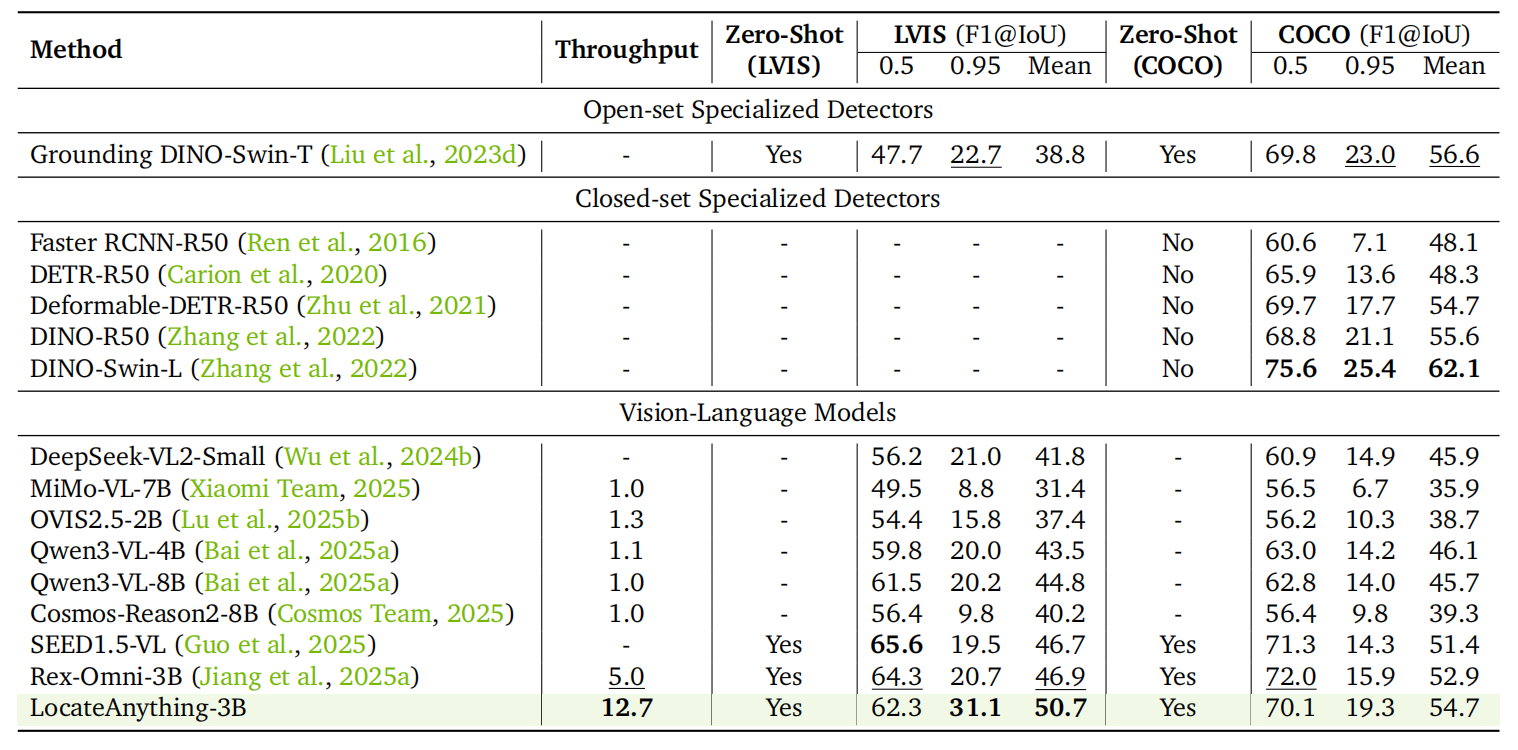
Its core innovation, Parallel Box Decoding (PBD), predicts complete bounding box coordinates in a single parallel step rather than autoregressive token-by-token decoding, improving efficiency while preserving geometric consistency. This enables up to 2.5× higher throughput compared to prior approaches.
The model is trained on a large-scale multi-domain dataset (12M images, 138M+ queries, 785M bounding boxes) spanning natural scenes, robotics, driving, GUI interaction, and document understanding. It serves as a foundation for generalist multimodal perception and has been integrated into NVIDIA’s frontier production-grade vision-language models, such as Nemotron 3 Nano Omni, supporting grounding, GUI understanding, and multimodal agentic capabilities.
LocateAnything is developed as part of the Eagle VLM model family. This released model is for research and development only. In addition, LocateAnything contributed to Nemotron and Cosmos as part of the Computer Use and Visual Grounding features. We give special thanks the Nemotron and Cosmos Teams for time and efforts in product integration.
This model is released under the NVIDIA License for non-commercial use, which permits use, reproduction, and modification for academic and non-profit research purposes only. Commercial use is not permitted, except by NVIDIA and its affiliates. Redistribution must retain the license and all applicable copyright and attribution notices. The model is provided “as is” without warranty of any kind, and users assume all associated risks.
This model is built using components from third-party models with their respective licenses:
Models are improved using Qwen.
Global
LocateAnything-3B is intended for developers and researchers building vision-language models and applications that require fast and precise visual localization from natural language instructions.
Supported use cases include:
Architecture Type: Transformer-based vision-language model (VLM).
Network Architecture: Native-resolution VLM with the following components:
Number of model parameters: 3B.
LocateAnything extends a vision-language model with Parallel Box Decoding (PBD), a block-wise multi-token prediction framework for efficient visual grounding. Instead of autoregressive coordinate generation, the model predicts complete bounding boxes and points in parallel structured units, improving decoding efficiency while preserving geometric consistency. The architecture jointly optimizes next-token prediction and multi-token prediction to balance reasoning ability and parallel inference. Training follows a four-stage pipeline: initial multimodal knowledge adaptation using captioning, VQA, OCR, and related data, followed by grounding and dense-scene localization fine-tuning.
Input Type(s): Image and Text.
Input Format(s):
Input Parameters:
Other Properties Related to Input:
Output Type(s): Text.
Output Format(s):
<box> x1, y1, x2, y2 </box>) and points (<box> x, y </box>).Output Parameters:
Other Properties Related to Output:
<null>.Our AI models are designed and optimized to run on NVIDIA GPU-accelerated systems. By leveraging NVIDIA hardware (e.g., GPU cores) and software frameworks (e.g., CUDA libraries), the model achieves improved training and inference performance compared to CPU-only solutions.
Runtime Engine(s):
Supported Hardware Microarchitecture Compatibility:
Deployment on embedded platforms such as NVIDIA Thor is possible with additional model optimization, including quantization, compression, or distillation. Other architectures may be supported depending on available memory, precision support, and software configuration.
Supported Operating System(s):
The integration of foundation and fine-tuned models into AI systems requires additional testing using use-case-specific data to ensure safe and effective deployment. Following the V-model methodology, iterative testing and validation at both unit and system levels are essential to mitigate risks, meet technical and functional requirements, and ensure compliance with safety and ethical standards before deployment.
LocateAnything-3B: 3B-parameter research model variant evaluated in Hybrid Mode by default. Fast, Hybrid, and Slow inference modes are supported by the same model formulation.
LocateAnything-3B can be integrated into systems that require spatial grounding from natural language, such as GUI agents, robotics/embodied agents, document-understanding pipelines, OCR/text localization, and open-world detection workflows.
Image and Text.
Image Training Data Size:
Text Training Data Size:
Data Collection Method by dataset:
Labeling Method by dataset:
Properties: The training data consists of supervised fine-tuning (SFT) datasets with multimodal inputs, primarily image-text pairs and structured annotations such as bounding boxes, points, and negative samples.
The data spans multiple domains, including grounding, open-world grounding, general and dense object detection, scene text detection, GUI understanding and grounding, document layout understanding, and OCR.
Modalities include visual inputs (images) and natural-language queries or instructions. The dataset is derived from a mixture of publicly available academic datasets, along with model-assisted and synthetic annotations. It may include publicly available and potentially copyrighted content; users are responsible for ensuring compliance with applicable usage rights.
The linguistic content primarily consists of short, task-oriented natural-language expressions, such as object categories, referring expressions, GUI instructions, OCR queries, and grounding prompts, typically in English.
Data Collection Method by dataset:
Labeling Method by dataset:
Properties: The evaluation datasets consist of publicly available benchmarks spanning visual grounding, object detection, document understanding, scene text detection, and GUI-related tasks. Modalities include image inputs paired with natural-language queries and structured annotations such as bounding boxes and points.
The evaluation suite covers both box-level and point-level grounding tasks, with approximately 48K images for box evaluation and 35K images for point evaluation across multiple datasets. These datasets span diverse domains including natural scenes, documents, aerial imagery, and human-centric interactions, enabling comprehensive assessment of localization accuracy and robustness.
Evaluation queries are typically short, task-oriented natural-language expressions such as referring phrases, object categories, and grounding prompts.
Performance is measured using box-based F1 at IoU thresholds of 0.5 and 0.95, as well as mean IoU for detection, layout, and OCR tasks. Point-based localization is evaluated based on whether predicted points fall within ground-truth segmentation masks or bounding boxes. Inference efficiency is reported in boxes per second (BPS) on a single NVIDIA H100 GPU with batch size 1.


Test Hardware: H100 & A100
We suggest using max_new_tokens=8192 and generation_mode="hybrid" to avoid truncated response and balance speed with accuracy.
This release includes batch_infer.py, batch_utils, and kernel_utils for
high-throughput detection and grounding. The la_flash backend is a pure
FlashAttention-varlen sparse range executor: it keeps LocateAnything's hybrid
MTP decoding path, avoids dense [B,H,Q,K] SDPA masks, and does not require a
custom CUDA extension build.
Use it with:
python batch_infer.py \
  --model . \
  --attn la_flash \
  --scheduler pipeline \
  --batch-size 4 \
  --image /path/to/image.jpg \
  --query "person</c>car"
A100 4K probe, real 3840x2160 street image, query=vehicle,
batch_size=4, raw PIL input, in_token_limit=25600, hybrid MTP inference:
| Backend | Attention Path | Time | Peak Reserved Memory |
|---|---|---|---|
sdpa |
Dense SDPA masks | 8.2600 s | 35.12 GB |
la_flash |
FlashAttention sparse range plan | 8.0314 s | 11.71 GB |
See batch_utils/README.md and kernel_utils/README.md for runtime knobs and
implementation details.
pip install opencv-python-headless==4.11.0.86 transformers==4.57.1 numpy==1.25.0 Pillow==11.1.0 peft torchvision decord==0.6.0 lmdb==1.7.5
PyTorch (
torch) must be installed separately according to your CUDA version. See pytorch.org/get-started.
Optional — MagiAttention (Hopper / Blackwell GPUs only, recommended for faster MTP inference):
git clone https://github.com/SandAI-org/MagiAttention.git
cd MagiAttention
git checkout v1.0.5
git submodule update --init --recursive
pip install -r requirements.txt
pip install --no-build-isolation .
If MagiAttention is installed, the model will automatically use it for efficient MTP block-diffusion attention. If not installed, it will fall back to PyTorch SDPA — fully functional but slower for MTP decoding.
Below is a self-contained worker that loads the model once and serves perception queries via a unified predict() plus task-specific convenience methods. You can drop this class into any FastAPI / gRPC / Triton serving framework.
import re
import torch
from PIL import Image
from transformers import AutoModel, AutoTokenizer, AutoProcessor


class LocateAnythingWorker:
    """Stateful worker that loads the model once and serves perception queries."""

    def __init__(self, model_path: str, device: str = "cuda", dtype=torch.bfloat16):
        self.device = device
        self.dtype = dtype

        self.tokenizer = AutoTokenizer.from_pretrained(model_path, trust_remote_code=True)
        self.processor = AutoProcessor.from_pretrained(model_path, trust_remote_code=True)
        self.model = AutoModel.from_pretrained(
            model_path,
            torch_dtype=dtype,
            trust_remote_code=True,
        ).to(device).eval()

    @torch.no_grad()
    def predict(
        self,
        image: Image.Image,
        question: str,
        generation_mode: str = "hybrid",   # "fast" (MTP) | "slow" (NTP/AR) | "hybrid"
        max_new_tokens: int = 2048,
        temperature: float = 0.7,
        verbose: bool = True,
    ) -> dict:
        messages = [
            {"role": "user", "content": [
                {"type": "image", "image": image},
                {"type": "text", "text": question},
            ]}
        ]

        text = self.processor.py_apply_chat_template(
            messages, tokenize=False, add_generation_prompt=True
        )
        images, videos = self.processor.process_vision_info(messages)
        inputs = self.processor(
            text=[text], images=images, videos=videos, return_tensors="pt"
        ).to(self.device)

        pixel_values = inputs["pixel_values"].to(self.dtype)
        input_ids = inputs["input_ids"]
        image_grid_hws = inputs.get("image_grid_hws", None)

        response = self.model.generate(
            pixel_values=pixel_values,
            input_ids=input_ids,
            attention_mask=inputs["attention_mask"],
            image_grid_hws=image_grid_hws,
            tokenizer=self.tokenizer,
            max_new_tokens=max_new_tokens,
            use_cache=True,
            generation_mode=generation_mode,
            temperature=temperature,
            do_sample=True,
            top_p=0.9,
            repetition_penalty=1.1,
            verbose=verbose,
        )

        result = {"answer": response[0] if isinstance(response, tuple) else response}
        if isinstance(response, tuple) and len(response) >= 3:
            result["history"] = response[1]
            result["stats"] = response[2]
        return result

    # ---- Convenience methods for each task ----

    def detect(self, image: Image.Image, categories: list[str], **kwargs) -> dict:
        """Object detection / document layout analysis."""
        cats = "</c>".join(categories)
        prompt = f"Locate all the instances that matches the following description: {cats}."
        return self.predict(image, prompt, **kwargs)

    def ground_single(self, image: Image.Image, phrase: str, **kwargs) -> dict:
        """Phrase grounding — single instance."""
        prompt = f"Locate a single instance that matches the following description: {phrase}."
        return self.predict(image, prompt, **kwargs)

    def ground_multi(self, image: Image.Image, phrase: str, **kwargs) -> dict:
        """Phrase grounding — multiple instances."""
        prompt = f"Locate all the instances that match the following description: {phrase}."
        return self.predict(image, prompt, **kwargs)

    def ground_text(self, image: Image.Image, phrase: str, **kwargs) -> dict:
        """Text grounding."""
        prompt = f"Please locate the text referred as {phrase}."
        return self.predict(image, prompt, **kwargs)

    def detect_text(self, image: Image.Image, **kwargs) -> dict:
        """Scene text detection."""
        prompt = "Detect all the text in box format."
        return self.predict(image, prompt, **kwargs)

    def ground_gui(self, image: Image.Image, phrase: str, output_type: str = "box", **kwargs) -> dict:
        """GUI grounding (box or point)."""
        if output_type == "point":
            prompt = f"Point to: {phrase}."
        else:
            prompt = f"Locate the region that matches the following description: {phrase}."
        return self.predict(image, prompt, **kwargs)

    def point(self, image: Image.Image, phrase: str, **kwargs) -> dict:
        """Pointing."""
        prompt = f"Point to: {phrase}."
        return self.predict(image, prompt, **kwargs)

    # ---- Utility: parse model output ----

    @staticmethod
    def parse_boxes(answer: str, image_width: int, image_height: int) -> list[dict]:
        """Parse model output into pixel-coordinate bounding boxes.

        Coordinates in model output are normalized integers in [0, 1000].
        """
        boxes = []
        for m in re.finditer(r"<box><(\d+)><(\d+)><(\d+)><(\d+)></box>", answer):
            x1, y1, x2, y2 = [int(g) for g in m.groups()]
            boxes.append({
                "x1": x1 / 1000 * image_width,
                "y1": y1 / 1000 * image_height,
                "x2": x2 / 1000 * image_width,
                "y2": y2 / 1000 * image_height,
            })
        return boxes

    @staticmethod
    def parse_points(answer: str, image_width: int, image_height: int) -> list[dict]:
        """Parse model output into pixel-coordinate points."""
        points = []
        for m in re.finditer(r"<box><(\d+)><(\d+)></box>", answer):
            x, y = int(m.group(1)), int(m.group(2))
            points.append({
                "x": x / 1000 * image_width,
                "y": y / 1000 * image_height,
            })
        return points
worker = LocateAnythingWorker("nvidia/LocateAnything-3B")
img = Image.open("example.jpg").convert("RGB")

# Object Detection
result = worker.detect(img, ["person", "car", "bicycle"])
print("Detection:", result["answer"])

# Phrase Grounding (multiple)
result = worker.ground_multi(img, "people wearing red shirts")
print("Grounding:", result["answer"])

# Scene Text Detection
result = worker.detect_text(img)
print("Text Detection:", result["answer"])

# Pointing
result = worker.point(img, "the traffic light")
print("Pointing:", result["answer"])

# GUI Grounding (point)
result = worker.ground_gui(img, "the search button", output_type="point")
print("GUI Point:", result["answer"])

# Parse structured output into pixel coordinates
w, h = img.size
boxes = LocateAnythingWorker.parse_boxes(result["answer"], w, h)
points = LocateAnythingWorker.parse_points(result["answer"], w, h)
| Task | Worker Method | Output | Prompt Template |
|---|---|---|---|
| Object Detection | worker.detect(img, [...]) |
Box | Locate all the instances that matches the following description: [CATEGORIES]. |
| Phrase Grounding (single) | worker.ground_single(img, phrase) |
Single Box | Locate a single instance that matches the following description: [PHRASE]. |
| Phrase Grounding (multi) | worker.ground_multi(img, phrase) |
Multiple Boxes | Locate all the instances that match the following description: [PHRASE]. |
| Text Grounding | worker.ground_text(img, phrase) |
Box | Please locate the text referred as [PHRASE]. |
| Scene Text Detection | worker.detect_text(img) |
Box | Detect all the text in box format. |
| Document Layout Analysis | worker.detect(img, [...]) |
Box | Locate all the instances that matches the following description: [CATEGORIES]. |
| GUI Grounding (box) | worker.ground_gui(img, phrase, "box") |
Box | Locate the region that matches the following description: [PHRASE]. |
| GUI Grounding (point) / Pointing | worker.ground_gui(img, phrase, "point") / worker.point(img, phrase) |
Point | Point to: [PHRASE]. |
[PHRASE] is a free-form natural-language description; [CATEGORIES] is a comma-separated list (multiple categories may also be joined with </c>).
| Mode | Description | Speed | Accuracy |
|---|---|---|---|
fast |
MTP only, never falls back to AR | Fastest | Good for simple scenes |
slow |
Pure auto-regressive decoding | Slowest | Most robust |
hybrid (default) |
MTP first, falls back to AR on uncertain boxes, switches back after box boundary | Balanced | Best overall |
This repository also includes optional utilities for high-throughput detection runs:
batch_infer.py: JSONL/image-query batch inference CLI.batch_utils/: batched hybrid generation runtime. See
batch_utils/README.md.kernel_utils/: LA Flash sparse range utilities. See
kernel_utils/README.md.Run a small batch inference job:
python batch_infer.py \
  --model . \
  --attn la_flash \
  --scheduler pipeline \
  --batch-size 4 \
  --image assets/pointing.png \
  --query "the object being pointed at"
The batched sparse-plan decode runtime is intended for inference/evaluation and
does not support the training labels path. Training remains on the
MagiAttention backend.
NVIDIA believes Trustworthy AI is a shared responsibility and we have established policies and practices to enable development for a wide array of AI applications. When downloaded or used in accordance with our terms of service, developers should work with their internal model team to ensure this model meets requirements for the relevant industry and use case and addresses unforeseen product misuse.
Please make sure you have proper rights and permissions for all input image and video content; if image or video includes people, personal health information, or intellectual property, the image or video generated will not blur or maintain proportions of image subjects included.
Please report model quality, risk, security vulnerabilities or NVIDIA AI Concerns here.
Base model
Qwen/Qwen2.5-3B